
The iPhone phone application allows you to make calls over your mobile network. In addition to containing the Contacts application, and being able to make a call from a Conact listing, you can also press the keypad button at the bottom of the screen to bring up a traditional phone keypad.
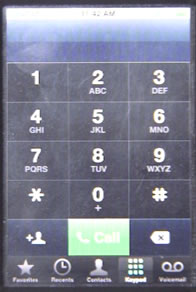
One nice thing about the iPhone phone keypad is you have a backspace button, so you don’t need to start all over again if you make a mistake in entering a number.
You can also enter a phone number in the keypad, and then press the + button at the lower left to simply create a contact for the number you’ve entered.
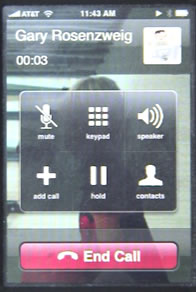
Once you place a call, you will get a set of buttons: Mute, Keypad, Speaker, Add Call, Hold and Contacts. The Hold, Mute and Speaker buttons do as you would expect. The Keypad allows you to enter in touch-tones if you are calling an automated system. Add Call allows you to call someone else and create a conference call. The Contacts button lets you view and edit contacts while talking.
The Recents button at the bottom of the Phone application allows you to see and redial phone numbers you have recently called or have called you.


is there a way to turn on "auto complete" so I don't have to retype my email address and other form field data?
Also, how do I delete specific "recent calls"? It seems the only option is to clear all. Does it save a certain number of calls? Or are calls saved a specific number of days/hours?
To delete a specific "recent call' simply pull up the list of recents, then wipe across the name to delete and the option appears to the right. If this action was done by mistake, as it often happens, simply wipe across again to undo.
Can't answer the duration question!
sabrina: I don't think there are command for those things. We'll just have to wait for Apple to add them.
I am trying to do some freelancing work, but I do not want to publish my personal phone number provided by ATT to avoid unwanted calls. Is there an app that will allow me to create/provide a number apart from my iphone number so I can publish that number and not worry about unwanted call (telemarketers, prank callers)
Darshan: That's not something an app can do. It really isn't a solution that can be done by AT&T or your iPhone. What you probably want to do is get a business phone number through a service that allows you to redirect the call to anywhere. Lots of companies do this -- voicemail, forwarding, etc. Google's Grand Central is perfect, but they are closed to new users right now. But you can find other services.
the keypad cannot press how i can i make a call i can't get thru pressing numbers
ehbe: Sounds like a problem. I'd bring it in or call support.
Hi, i got a problem with my phone aplicattion that when i open it it closes inmediatly i cant even see my favorites or anything, i can also receive calls but i cant end them because it doesn't display the regular screen that displays when you are talking, it keeps displaying the aplicattions screen, anyone knows what to do?
You should do a Restore using iTunes to reset your iPhone completely. Another option is to take it into the Apple Store to have them take a look at it.
wish to know how to copy phone numbers from the handset to the sim card and vice versa. have a 2G handset, can i download ringtomes, i was advised not to try because the handset may get locked up
The sim card isn't used for that on the iPhone. As for ringtones, adding new ringtones to your iPhone is easy and fun -- just use iTunes. I've got various tutorials on how to make your own (http://macmost.com/make-your-own-iphone-ringtones.html), and a whole set of ringtones available at MacMost for free: http://macmost.com/free-iphone-ringtones
I recently upgraded to an iphone from a blackberry bold. I had an app on my BB that was called call control. It blocked unwanted phone calls and allowed me to make a 'blacklist' of people that I didn't want to talk to and could add to the list so they were automatically redirected to my voicemail. Is there an ap like this for the iphone? I have former inlaws that like to make unneccisary phone calls and texts and I would love that feature on my new iphone. Also is there a firewall that I can set up in my iphone to prevent people who are not on my contacts list from texting me?
I don't believe any of that is possible. You might want to try changing your phone number, but instead of giving anyone your new number, use a service like Google Voice to route all your calls through there. Then control who calls and texts you from that service.
Once you place a call, and choose the keypad, you can no longer delete mistakes (e.g., incorrect credit card digit), as the backspace button has disappeared. Am I missing something? Is there a solution to this via an app?
accidently wiped off my iphone the telephone icon. where can i download it again?
You don't need to download anything. You just need to reset your home screen. Settings, General, Reset, Reset Home Screen Layout.