
The iPhone Weather application allows you to quickly view the local weather and a five-day forecast. It shows the forecasted high and low temperature, and a weather icon, such as sunny, or partly cloudy.
Also: Having trouble understanding what a weather icon means? This page of iPhone weather icons may help.
You can have several locations in the weather app. Just press and flip to the right or left to move between locations. The dots at the bottom of the screen show how many locations you have, and the white dot shows your position in the locations list.
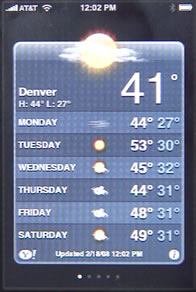
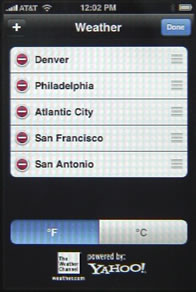
If you click on the i button at the bottom right, you can see the cities you are following, and click on the button to the left of each to delete them. You can also press and drag the right side of each item to move it up and down in the list. The bottom of the screen allows you to switch your preference between Fahrenheit and Celsius.
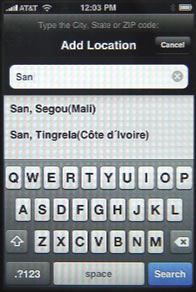
You can also click on the + button at the top of the screen to look up another location and add it to the list.
Weather data is provided by Yahoo!.


I have lost my iPhone weather app that came with my iPhone! Can I reinstall it? Which weather app might it be?
I had the same issue. My iPhone froze; there were little black crosses against each of the apps; and when they cleared the Weather app was gone. As rosenz notes - I shouldn't be able to get rid of a pre-installed app
My weather app disappeared. did you ever get yours restored?
I deleted/ lost my I weather application that came with phone, and like to re install it.
Try Settings, General, Reset, Reset Home Screen Layout
fanrtastic that worked!
Gary your a wizard I tried it exactly as you said above App appeared Thank you
Lost my weather app. How do I restore it?
See my response two above yours.
Cyndy: How did it get lost? You shouldn't be able to get rid of the pre-installed apps, these are different than the 3rd-party ones and aren't in the App Store at all. You shouldn't be able to delete these on a non-jailbroken iPhone. Your options may be to restore the iPhone (backup, restore, through iTunes) or to simply forget about it and find another Weather app in the store to replace it. Or, bookmark a good weather site through Safari and use that.
I wish I could lose the default iPhone weather app.
I agree. I am new to the iPod, but am very disappointed with the low quality of the iPod OS and of some of the "permanent" apps (such as the poor default Yahoo weather app). The iTunes software is also pretty low rent when compared to 3rd party options. Apple Should listen to some of the feedback. An android may soon be on my horizon.
My wife and I both have the same I phone and the same weather app. We both have the City of Two Harbors, MN and have noticed that we are getting different data. When it is updated hers will show a temp of 50 degrees and mine will a different number. Do you have any suggestions?
Are you using the built-in Weather app? Or some 3rd-party one? If a 3rd-party app, then contact the developer and see what they say. The built-in app gets weather from Yahoo, I think. Perhaps it doesn't update that often and you are getting different updates at different times.
My issue is similar. I have iphone 4 and have noticed lately that while the weather app says it as updated it in fact has not. Today is Tuesday and I'm still getting forcasts for last Saturday both for my locale, Columbus OH, and for San Antonio TX. This has been happening for several months now, and it's getting annoying. I actually saw one time today where I had a forecast for Columbus OH, that was correct, then later it reverted to the last Saturday forecast. Has anyone else ever had that problem.
It's been happening to me too! I tried restarting my phone, but that doesn't help. I've also seen this happen on one of my friend's iPhone. If anyone has any ideas for fixing this, please share.
I should add that I have a 4s and I've had this problem with the pre-installed weather app since I upgraded this past November. I've been in the iPhone family since February 2008 and have never had a problem. So this is a bit disappointing.
exact same story with the weather app. the local reverts to saturday tho the other cities i have added remain correct. it is very confusing and clearly must be corrupted because it is intermittent. when i delete local and start over it is correct and then screws up again.
I would guess that you have one set to Fahrenheit and the other Celsius - to change setting - use the "i" on the bottom right of the screen.
Haha! Common sense always prevails!! I've been so frustrated with my weather app and this simple common sense note worked for me! Thank you. Big mental smack on the forehead!
Thankyou :)
Have wife move to Duluth.
I can't figure out how to get rid of the 2 default cities in the weather program and get the cities that I want into it. I deleted the CA city and put in my city but it wound up on the 2nd set if aps, not on the weather one, where I'd like to know the outside temp and the CA city was back on the front page.
So it shows you have 2 Weather apps? That's very odd. Try syncing with your computer to see if it clears it up.
Touch the i at the bottom right of the screen. Touch the - button to the left of the cities and the "delete" icon show. Press done at top right when done adding or deleting cities.
Can you tell me where to find what the very cryptic icons mean for the forecast weather ? This is for the standard iPhone weather app.
I don't know of any list. Never thought they were very cryptic -- seem pretty straight-forward to me.
Me too! There's an icon I've never seen before on my Weather app forecast for tonight under "Local Weather" (a new category for iOS5) that looks like sleet, but I don't think it's cold enough here for that. I wish there was a legend or key to explain the weather symbols in plain text. Of course, rain, sun, cloudy are obvious, but this new one is not obvious. It could mean sprinkles, or mist, or tiny snow flakes!
I've just put together a page of iPhone weather icons that may help.
It means clear skies...you'll see the stars
So if they are so obvious to you, tell us the secret! Esp for the various snow icons. It is important to know the difference between flurries, light snow, and heavy snow!
The weather comes right from Yahoo, so what you could do is to visit the Yahoo weather page for the same exact location and then read the words under them to see what they mean.
Its 1:45 am in Oakland CA. This the city in my iPhone weather widget from yahoo. The date is Wed November 23, 2011. The strange thing is that the top date on the weather widget is Tuesday from 2:00 am to 1:00 pm. It does not even show the next missing 13 hours to current time. Someone has a coding mistake. I can email a photo of the screen including the correct updated time date at the bottom of the screen. Thanks,
Eddie
Ii just got my first iPhone. The weather app gets some screwy data. My brother lives in Winter Springs, FL, and when I add it, trhe iPhone weather app says the weather there this week is sub-freezing, with overnight lows in the single numbers!! My GF's mother is in Phoenix, and it says it's cold there, too.
Bangor, ME and most (but not all) of my local sites seem to report more accurately.
Is this a known problem with the iPhone weather app? I can't imagine Yahoo or The Weather Channel having such major errors on their sites (although I admit I have not checked...)
Press the little "I" icon at the bottom of the screen and there will be a "F" and a "C" at the bottom of the screen you probably have it set to Celsius.
Allen TX 75013 is showing the wrong temperature for the area. When I look at the surrounding cities (Plano, Mckinney and Dallas) they show the correct temp. I use your app for work and would appreciate if you guys could check this out. Great App BTW! Thanks
I think you misunderstand. This is a Web post about how to use the default Weather app on the iPhone. WE do not make this app, it is made by Apple. It actually pulls data from Yahoo Weather, so the error is most likely with Yahoo.
Good for local weather.
Maybe too late for first question but I lost my weather icon too and was able to get it back by going to settings, general, reset, reset home screen layout
You made the day for. Me! Reset home screen did it. My weather is back
Thanks for the tip... I had lost my weather app... and I really liked it. Your tip worked to bring it back, and I didn't lose all my other stuff. K
it works, thanks
Hey thanks. My wide likes this ap and it just disappeared one day.
Thank you. I'm, again her hero. Lol
Bill
My pre-installed iPhone 4 app icon stays at 73 degrees and sunny. When I open it, I see the correct 12 degrees. Help!
It does work! I know I could have found another weather app, but I got used to the pre-installed one. Thanks for sharing your knowledge!
Thank you for your post! Got the old weather back. All weather apps are silly but I was used to it. tnx for sharing
Yhis was such a simple fix that WORKED. The AT&T store said they couldn't help me unless i came into the store. How simple and successful! Thanks a million.
This worked for me too, many thanks.
This worked for me. Thanks!
The resep of the home screen layout worked for me. A BIG THANKS! I had asked the apple store dude how I can uncategorize all my apps and he said I had to do it manually. HE WAS WRONG!! This took care of both issues. SO HAPPY!!!!!
Thank you!
Brilliant, and so simple. Thanks.
My weather app is also gone!
My weather app also disappeared and thanks to Al and has reset home screen layout I got it back. Thanks Al!
Thanks Al. My weather app also vanished, but your tip soon sorted the problem.
Hello When you 1st buy an iPod or iPhone what city weather is in the iPhone/iPod? Can anyone tell me the city it comes with?
It depends where you live there different for different states
I want it. I will use it BUT it bothers me quite a lot that the geeks do not know that it is spelled "Tangier" not "TangierS"
The weather app provided on the iPhone is the most worthless and inaccurate app. It is almost 30 degrees off on a regular basis. All my friends' phones have the same problem. It's not just the forecasting of highs and lows. The current temperature is grossly inaccurate - all the time.
The data just comes from Yahoo Weather. Are you sure you have it set to the correct city? The Yahoo database has many cities with the same name. I didn't even know there was a Denver, Pennsylvania, for example.
Can anyone tell me why some of the weather listings backround color is blue with a sun, while others are purple with a moon or something. I don't think it depends on if it's day or night because I have both Duluth, MN and Minneapolis, MN and one is purple while the other is blue.
Alternating lines are a different shade to make it easier to read. Is that what you mean? Are you sure it is a moon?
Thanks Al! Got my weather app back too. Also, for those who have a like a 50 degree error in temp... Check that you have it set on Fahrenheit and not Celsius. Click on the i at the bottom of the screen to check it. It's 70 degrees where I am, but when it's set on Celsius it says 21 degrees.
The app designers have a strange understanding of logic. If you update without connectivity, you're left with zero data.
Wouldn't the LOGICAL thing be to validate connectivity and only discard previous data if it can be overwritten with CURRENT data
I live in Ilford, Essex. North east part of London, I set my location on this app, but it does not save it. Instead it seems to want to automatically set my location to Rislip, which is on the opposite side of London, (west London), I can delete this location, but every time I do, it just defaults back to Rislip. Anyone got any clues to what is going on?
Since a couple of days I have the same problem. When I select my hometown, the apps changes the name into a German town, nearby my hometown but nevertheless.
I have the same problem. Most of the town names are changed by different towns. Besides that, the system can't find my home town anymore! What has happened??????
Can't Apple fix this bug in the build in wheather app? It cannot even find my hometown anymore. It's a worthless app now. The towns into which the chosen towns are changed a miles apart!
This is probably a problem with Yahoo. Remember, the Weather App is just a window to the Yahoo Weather online system. Perhaps try a different weather app? Lots of free ones...
Since two years I used the App here in Switzerland and had shown the Weather from Zürich and Scouls fine. But since a few days the Scoul Kanton Graubünden switched to Brunico and it is not available in the selection. Does anyone know what happend.
I discovered the same phenomena. I went to the yahoo weather page to see what happens when I put in the search bar town.
I see that the weather apps name of my hometown is replaced by the name of the nearest weather station.
for instance Hoofddorp (the Netherlands) changes in to Haarlem (the Netherlands). Indicates to me that something changed in the application not particular in Yahoo weather. Or that the name of the city now is in a different place on the Yahoo weather page.
Anyhow eather Apple or Yahoo did something.
I don't know who fixed it. My town SCUOL is back again. Thanks for that
It drives me crazy. Now I have the new iPhone 4 SCUOL isn't here anymore but I still find it on yahoo.com "Weather >Switzerland >Canton of Graubunden >Scuol" any suggestions how that can be.
This seems to be a problem for all users. I live in Norway and only one city is available in the app. Before the last IOS update I could find almost every city, but now i cant even find the largest cities.
I dont think the problem lies with Yahoo. Yahoo can display the weather for just about every little city in the world. But after the last iphone update the number of available cities has been severly reduced.
As a registered Apple developer I will download the beta for the next iOS update and see if they have fixed it there.
I'm having the same issue. Used to have all these cities in towns and they were erased during the update. Now I can't get them back.
I just got my first iPhone and the weather app keeps changing my city name from Whistler to Gibson, does the same thing for the next closest town, Squamish, changes its name to Gibson on the phone every time, VERY annoying, any suggestions how to fix?
I have this same problem. Im just going to use a better weather app. The only thing the default app has going for it is the convenience of having it be preinstalled. Apart from that its bunk.
somehow lost the weather app from my iphone 3gs - am unable to locate the app for download - I want the native yahoo thing but cannot find it anywhere to download - any suggestions?
It is not available for download. It comes with your iPhone and you can't delete it. Check and recheck as it should be there. If not, you will have to restore your iPhone (there may be more wrong with it if this happened anyway).
Mine disappeared this morning too.
I am still having issues with the icons and figuring out what they mean! I have gone to the yahoo website to see if they are the same and they are vastly different. I understand the snow/rain and the snow one but now my regular snow turned to a snow with some white blob underneath it. It's so small I cannot tell what it is. Does this mean lots of snow accumulation? Help! There should be some key or guide to the icons.
I get all the icons except the one with the white thing under the snow. I'm guessing it means accumulation but jw. Anyone tell me for sure?
Go to the Yahoo weather site on your Mac or PC. Look up the weather for your area. You should see the same icons. But on the web, there is also text under them.
Some of us are in disagreement as to when the low temperature listed on the far right for, say, Saturday, actually occurs. I believe that will be the low temperature that will occur "after" that Saturday's high, thus sometime during the night of Saturday/Sunday. Is this correct?
I don't know, sorry. Perhaps a meteorology forum would be the best place to ask?
how do I copy the weather update into my status?
I don't believe there is any copy function in this app. So why not just go to a weather web site instead. You can certainly copy text from that, and then paste it into whatever you want.
My weather app on my Iphone is wrong. It shows some off the wall temp. I live in ohio and it is saying its like 75 degrees here i wish but it is not. any ideas on why or how to fix it or another weather app
It is probably set to a different city with the same name as yours. Check it. You can also find plenty of apps much better than the default one that comes with your iPhone: http://macmost.com/iphone-weather-apps.html
wow. good to see that i'm not alone in seeing the weather app frequently has the wrong current temperature for other people also. my own example: the other night was something like a high of 59 with a low of 41, but current temp at 3:00 AM early in the morning was 74! and then this last nite at about 1:00 AM the current temp was 11 when it should be forty-something. and yes the app was correctly set for my city of chula vista, california. i guess for the live temperature that Apple may have some bad algorithm pulling the wrong current temp from yahoo. either that or Apple has a volunteer in my city with a thermometer hooked up to wi-fi that is indoors next to the volunteer's heater the other nite but then moved next to the refrigerator this last nite! lol. my solution for the moment is to set the city to my next door city of san diego which the weather app seems to be more consistent with. otherwise, i guess we all could set the weather app back to the default city of cupertino if the weather is going to be wrong anyways. lol
The Weather app just pulls data from Yahoo Weather. Apple doesn't have its own weather reporting system. There are many many better weather apps. You don't have to stick with the default one. See: http://macmost.com/iphone-weather-apps.html
geez you're just giving your stock answer aren't you. lol
you probably didn't read what i wrote or just quickly scanned what i wrote. no matter you're busy. i understand that. but for this nagging issue i was happy to read every comment on this page because i wanted to know what everyone else was exactly saying about this particular issue about this weather app.
anyways, i didn't say apple had a weather reporting system. i said they probably had a bad algorithm in the app that was probably pulling the wrong live current temperature from yahoo. i did mention yahoo.
the weather app is FINE except for the current temperature. as mentioned my solution is to set the app to the city next door from me (literally across the freeway from me) because from what i can tell is the app gets that right more consistently.
oh i also already have the weather channel app, but thanks for the suggestion about getting other weather apps because that is worthing repeating.
Well it might be worth repeating if it wasn't said every other comment. People just want to find out the answers to what they already have. I know I do.
I've gone to the yahoo weather site, and haven't found the answers I supposedly was to find. Instead of telling everyone to get a different app or go to yahoo site, or automatically assume we are all idiots and can't locate the "actual" city we live in, maybe someone could just help us find the answers to the questions we ask.
Excuse any misspellings or grammar mistakes. It's Hard typing on iPhone keypad sometimes.
I'm sorry that you are not satisfied with what you have read here. But all the information -- all the "answers" have already been discussed on this page:
1. The weather info comes from Yahoo, not Apple. It is presumably the same data as on the Yahoo Weather site, though no one outside the programmer of the app knows for sure.
2. It is a common mistake that people set the app to the wrong city (same city name, wrong state). I have seen this myself. I have helped people who have made this mistake. So it is worth mentioning. I don't know if you are an idiot as I have never met you. But I am trying to relay what I know has worked for others.
3. If the app is set to the right city, and it still shows bad data, then there's not much you can do about it. The app may be at fault, or Yahoo's weather data. What Yahoo shows on their site may differ from what Yahoo gives to apps. No way to know unless you are in that department at Yahoo. So getting another free Weather app is the best solution in my opinion. If you have another solution, you are welcome to post it.
I like the app, but recently, I don't get an update for the weather in the cities in the county in which I live. Other cities update, but my area does not. What's up with that? Does anyone have a solution or where I can go to find an answer? I've looked on Yahoo Weather and the Weather Channel for help, but I can't find any.
Can someone please just tell me what the icon that looks like bouncy white balls means? It looks like hail but it's driving me crazy trying to figure it out. I have tried going to the yahoo website to find it but the forecast is different for that day.
Hiya iv had this too and it's really annoying me have u found out what it is :)
Freezing Rain
i have a new verizon iphone and the weather.com app was the first thing i purchased.
somehow the bar at the bottom of the screen that has the icons on it (weather, map, severe, etc) has moved half way up the screen.
i am not sure what i hit to change its location - but how do i get it back to the bottom?
tks,
gil
I'd uninstall it and re-install it. Also, contact the developer to report the issue.
how do it unistall and then re-install - must i pay for it again?
tks,
gil
No. If you are using the same iTunes account it knows you already "own" it.
But what I would do is to delete it from your iPhone and then re-sync to your Mac to have iTunes re-install it. No download needed.
i ended up getting charged for it - but i think that is because i did everything from the phone this time (vs on the computer) and didnt do a sync with the computer?
You definitely should not have -- where you using the same iTunes account? Are you sure it was the exact same app (some look very similar). Are you sure you were charged? Just because you got a "thank for purchasing"-type message doesn't mean you were charged.
My default weather app is set to my hometown. I deleted the California city it was originally set for. However, on the app face it still shows the current weather for that California location. For example it is currently showing 73 degrees Farenheit and sunny. If I click on the app, it shows the weather for the only town listed when I press the "i" on the lower right corner. That weather is currently 26 degrees Farenheit and partly sunny. How can I get 26 degrees and partly sunny to show on the face of the app, without actually going into the app? Again, my hometown is the only town listed when I press "i." I have synced this phone with iTunes many times and my software is up-to-date.
Are you talking about the icon? The icon is just a static graphic. It won't change to reflect anything.
Okay, so you know how, for example, when it's going to rain on Wednesday, it'll show a picture of rain by the word 'Wednesday'. Or if it were going to snow on Wednesday, it would show a picture of snow by the word 'Wednesday'? Okay, so let's say that instead there's going to be a twister or a tornado! What would the picture look like by 'Wednesday' if that were the case? And, is there even such thing as picture of a tornado in the app? O
@Debby, that's suppose to be like that. You can't change it. It's just the picture of the app and that's it.
Would anyone be generous enough to please answer my question? Thanks, I've been wanting to know for a long while now.
Do you mean what would the icon picture be if there was tornado warning? I don't know if they get that specific. Those are Yahoo's weather icons and as far as I can find out there is no list of those icons available.
I bought my iPhone last 7/15/10. I am 84 & I like things to be in proper order. Being of the age I am I get up several times a nite. I found that
the Weather App did not change at midnite. This has worried the hell out of me. I have complained to Apple. They gave me a new iPhone.
That didn't do it. I have complained to everybody. I cuz Apple out every day.
Does anyone have an answer?
So, I have my city in the yahoo weather thing, yet the temperature doesn't change on my home screen to match what the current temp is if I click on it! Any suggestions??
Nevermind!!!!!!! I got the answer to my question!!!!!
Thanks, I lost my web icon and the reset home screen layout under general fixed it
I still don't know how I lost it
Really silly question. I have an iphone and loads of my friends upload a pic of their current weather from the i phone app when they are on holiday etc etc. How do I post a pic of my selected weather to Facebook...stumped.? eg..if I am looking at the weather app for phoenix how do I get it from there to FB.?
One way to do it would be to take a screen shot of the iPhone screen while looking at the weather. Just hold the sleep/wake button and the home button at the same time. This puts a screen shot in your Camera Roll. You can then upload it with the Facebook app.
I do not understand why the iPHONE default weather app shows my city Brentwood at 64 degrees, but at the same time, the Weather Channel app shows my city at 74 degrees. That is a big delta between the two temps. Which one is grossly off?
How do i post the weather pictures in my iPhone to facebook?
View the weather. Take a screen shot (hold top button and home button at the same time). Then in the Facebook app just post the screen shot which appears as a photo in your Camera Roll.
Every time I try to take the screen shot it wants to shut down.
Maximum temperatures provided on my inbuil Iphone app for Hobart Australia weather are always about 5 degrees celcius less than the Yahoo weather site or any other weather forcast. Check it yourself. Why?
Is there a way to see what state a city is in that you've added to the iPhone preloaded weather app? I have 3 jacksons - Ms,
Mi, Wy, and I can't tell which is which!!! Am I missing something or is the app lame?
It is lame. You can always remove it and add it again. Or, get a better app (see the link at the top of this page).
Just got iPhone 4. I changed the weather location to my city. Weather icon reflects temp for NY which I deleted from list. How do I get icon to reflect temp for my city? I only have 1 city on the list.
I don't believe the icon shows you anything. It is just a static icon.
Search results are completely wonky now. I put in my city after the app somehow stopped working, and any results are completely random. I live in Orlando but the search results give me completely random cities! I think it's a permanent problem.
I'm having the same issue!!!!!!
So - this APP is powered by yahoo - and it seems that there are a lot of areas that are not covered properly - In Northern California - the temp reads the same for inland as it does for 35 miles away on the coast - inland can be 90 and coast 50 - but all areas say 90 - Not the best covered area I suppose - but you would think that a large company like yahoo would pull from local sources - or offer a repository for locals to up load local results to.
Can anyone please tell me why sometimes the background on this app is blue and other times it is purple? What does that signify, I can't figure out a pattern.
Purple = night (after 6 pm). Blue = day (after 6 am)
my weather is gone and reset didn't bring it back. not in new motivation on ios 5 either. could I possibly have deleted it along with my stock ticker? can I get them back?
Did you try Settings, General, Reset, Reset Home Screen Layout?
Is there a way to get the Bahamas weather with the default iPhone app? I searched for both Bahamas and Nassau with no luck. Thanks!
My Weather app has the city and beneath it Hourly. My wife's phone has the city and the high and low for the day underneath. How do I change her phone for hourly readings?
Tap right there in the middle.
I have for Thursday in Franklin, NH a symbol that I cannot interpret: white bouncy balls; like round lanterns. It makes no sense to me. Does Anyone know what they are indicating?
This is a good example of what I mention in a lot of replies above. If you go to Yahoo weather on the web, look for Franklin, NH and look at Thursday, you can see it says "Rain/Freezing Rain" -- so I would guess that the icon you see is for "Rain/Freezing Rain" or just "Freezing Rain".
Apply that any time you see a symbol and don't know what it is.
Is there anyway to get the weather for Antarctica? I've tried McMurdo Station, Vostok Station and Antarctica to no avail. I just thought it would be fun to have.
Look at Yahoo's weather site and find out what they have.
I own a small company. We have about 10 iPhones. After problems with IOS5 we have all noticed that the weather app is not always working. I have several screen shots of what is happening. It seems that in 1 or 2 and sometimes 3 cities that we watch the weather is wrong. Today (Wednesday Dec. 21, 2011) the weather in Corpus Christi shows rain and that it is Saturday there. We've noticed that after about 20 mins we can update and sometimes it gets corrected. This happens randomly for the cities we watch (not just Corpus).
Is happens on iPhone 4's - 3GS's etc. all with IOS5
I doubt it has anything to do with your iPhones or the app. It is probably just Yahoo's weather data feed that is messed up.
My partner and I are both having weird issues with the Weather app. It may be Wednesday midnight , and 6 of my 7 cities are showing appropriate temperatures and nighttime colors and hourly weather starting with 1am or whatever the local time zone is, but one of them (this time it's Irvine, CA) is showing Saturday, daylight color, and 2pm hourly weather (probably old data). I close the app, re-open it, same problem. A little later I come back to it and all cities are fine. Next day, same problem, different city. Has anyone else seen this happen?
I know it isn't "the wrong city" or "F-to-C" translation. It's old data that is somehow stuck for one or two cities at a time. I can't find anything about it on Apple's site.
the weather app just disappeared from my ipod. how could i get it back?
Check to see if you have moved it into an app folder by accident. If it isn't in any app folders, then just Settings, General, Reset, Reset Home Screen Layout.
My weather app still remains but the icon or picture on the top that shows how weather is was gone, do you know how can i get it back
Help! My iPhone weather app icon displays a constant 73 sunny degrees. When I open the app it shows the real temp, 12 degrees.
The icon is just an icon. It doesn't display the current temperature.
My weather app still remains but the picture was gone. Only left a blank square box.do you know how can i get the pic back?? i've tried the reset home screen button though.
Sounds like something is wrong. You'll need to try a backup+restore.
How can i post this weather forcast to my facebook ?please!
Take a screenshot of the weather forecast by pressing the power button and main button (round button on the face of the iphone). Then go to your Facebook application and upload the photo on your iPhone.
Hello I really like your weather could you allow me to download the weather that you have
I had the same problem however I only needed to push the home and lock buttons together very quickly and then it worked and saved in my camera photos.
This one's for Gary (if still "involved"). I can add my hometown/location Huntington, NY and OT reflects weather for same. However, I've turned the Local Weather off, because whereas it once read my location correctly as "Huntington, NY", it now reflects my location incorrectly as "Bay Hills". I e-mailed skyhookwireless.com, the locator twice, but their tech support has never replied. I'd rather not register with Yahoo! to report the problem. Do you have any idea how I can correct my location on my iPod Touch?
I hope I'm still involved. It is my site, after all. :)
Why not just set the weather location to what you want and forget about using the locator?
Thanks for your expeditious reply, Gary. Sorry for the delay with my reply to yours. I was away. Anyway, I misread the year on your earlier post before posting my first and thought it was awhile ago... Ergo my query about the status of your "involvement" with this forum. In other words, I wasn't certain if the forum was still active. Anyway, long story short, what you suggested I already did before I even posted the first time. I can live with that solution, but it bugs me that I can't simply correct the location so that my iPod Touch "knows" my location is actually Huntington and not Bay Hills. The main reason I posted in the first place was to ascertain whether your "flock" or you knew how to achieve the location correction. Skyhook Wireless never replied to my email. Do you know how to "retool" the iPod Touch locator to have it "see" my correct location?
There is no way to do what you are asking. And no need. Simply go into your Weather app settings (press the i button) and turn off local. Then add your exact city as the first entry. Then you'll get the weather you want when you launch the app.
That you for giving my inquiry your attention and consideration and your reply. As stated twice now, I long since did that which you suggested before I even made my first/original post here. The point of my post was simply to ascertain whether it was possible to restablish the original/my correct location for the Local Weather feature in my iPod Touch's Weather app. Now that you've advised that's not possible, I will live with the addition of my town as an additional location to serve i instead for my local weather, However, and for the record, I think it's pretty ridiculous that Apple puts forth a weather app that is unable to "read" (know) one's actual location. Thanks again. -- Steve
How do you turn off the "local" weather on an iPhone? There are no "weather app settings" as far as I can tell. Under the "Settings" icon, the Yahoo weather app is not listed (unless it's under a category and I just can't find it). In the app itself, all I can do is add or delete cities, but the "local" city doesn't show up under the editing section. "Local" is showing me a city I've never heard of (and I don't even know what state it's in), so I'd like to be able to correct it or else turn it off.
There's no way to customize the app further. Are you sure the local weather isn't just using a town center closer to your location than the center of the city you live in? Is it accurate?
my friends uploaded their weather app. screen on facebook?how do i upload it??plz help
They probably just took a screenshot (press sleep/wake button and home button at the same time) which saves it in their Camera Roll. Then upload to Facebook with the Facebook app.
thanks...i have another problem..the "Local Weather" shows,for instance,29 degree, which is written in bold bigger size and was yesterday's...today's weather is shown in the "5 day forecast" i.e sunday..so how do i make the current weather shown in the above corner??i mean how do i get the current weather correctly
The app works the way it works -- if you want something different, try one of the many many 3rd-party weather apps. http://macmost.com/iphone-weather-apps.html
my iPhone 4s weather app used to show sun icon on a blue background (default). While looking at the weather is changed to showing the moon on a purple background... weird? I'd like to know how to go back to the default (sun on blue background) What did I do so I can undo it?
sorry but I can not see air pressure and humidity '...... values are always 0. Since they are important to me, can you help me to solve my problem on my iphone 4s? thanks
So they are there, but just with a 0 value. Perhaps Yahoo weather doesn't have that data for your area. Try another area (major city) as a test. Then perhaps try another weather app if they are important to you and Yahoo doesn't show them.
I can't find my current location in the weather channel application from iPhone.How to find my location?
(PS:My location is Toungoo, Myanmar(Burma).)
You may just need to use a nearby location of Yahoo doesn't have that one in their database. Or, try a 3rd-party weather app.
I have the pre-installed weather app on my iPhone and when I try to fine my nearest town it won't find it, as from that I can't find any of the surrounding town why? I live in Australia
Must mean that Yahoo doesn't have those towns in their database. The data comes from Yahoo.
I have had the same problem except no cities anywhere (Canada, Australia, U.S. and China are the countries I tried) can be added, it just keeps saying not a valid city. Yahoo has the cities I tried in their database when I search, the app will just not update or recognize them. My question is WHY? The weather app used to work fine up until 5 days ago.
I cannot get my hometown to stay on the weather app. I've tried multiple times. I know the local weather page has my hometown but I often leave my city for work or other reasons and I like to see what the weather is like in my home city. I've added my hometown city, so it has the local weather, a few random cities, and my hometown again. However, after a couple of days if I go back in to look, the hometown I've added is gone. Has anyone seen this before? Is it because Apple will not let you add a city that is listed under local weather?
The yahoo weather app that comes with the iPhone used to work beautifully before. Wherever I travel I could check the current location plus stay in touch on weather back home and friends and relatives overseas. But now , it can't even add a single city. It asked me to go to another iTunes Store. And when I click it says it is not available. What a joke.