
The iPhone You Tube Application lets you browse and view videos at the popular video sharing site YouTube.com. You can do this several ways: by using the Featured and Most Viewed lists, searching or viewing your video bookmarks or history. You can select from these options at the bottom of the screen. Press More to see other options, such as the Most Recently uploaded video, Top Rated videos. and your viewing history.
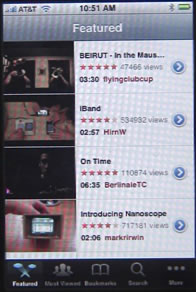
The Featured list shows picks from the You Tube editors. You can scroll up and down the list, and click on a video to view it.
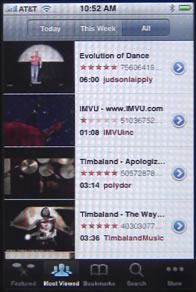
The Most Viewed list is similar, except that you can choose to see Today’s top videos, This Week’s top videos, of the All-time top videos.
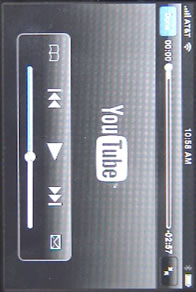
The other screens show a similar list of videos. When viewing a video, you can tap the screen to see a timeline and some playback controls. These controls also have a bookmark button on the left and an email button on the right. Just tap the bookmark button to add the video to your bookmarks. The email button will open up the email application and allow you to send an email with a link to the video.
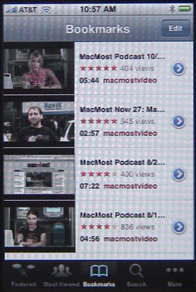
After you have bookmarked a video, you can go to the Bookmarks screen to see them. There, you can delete videos with the Edit button and view information about them by clicking on the blue arrow button to the right. Clicking on any other part of the listing will play the video.
The video information screen shows the number of views, rating, description, date, category and tags. You also get a Share button that opens up the Mail application. If you are looking at the information screen for a video that you haven’t bookmarked yet, you also get a Bookmark button.
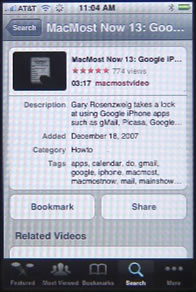
You also get the information screen when a video ends, or if you press the Done button while a video is playing. At the bottom of the information screen you will get a list of related videos, although this might take some time to load.
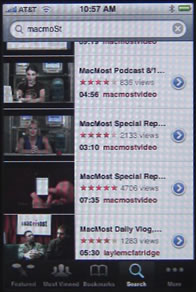
You can use the Search screen to search for videos by keyword.


As a mother and a wife, is there a way to see what video and when a video has been watched , even if the history is cleared?
Not on an iPhone -- at least not without serious hacking. You can do that on a Mac, though, through parental controls.
thanks for letting me know about the very last part of the section, i have always wanted to know why whenever a video gets uploaded, it's not available straight away, i often have to wait a couple of hours first, also, what iPhone do you use, i have a 3G and i love it! :D
Hi. We are trying to figure out how to use the very basic things our new iphone. I can't believe they didn't put an instruction manual in there. I guess we're just suppose to know? :) Anywho, How do you stop watching the video and go back once it starts playing? I'm sure we don't have to watch the whole video, when we didn't want to, before we are able to go back to watch the one we wanted. It's very frustrating, and we'll be waiting to find out how to do this before we use it again. I'm sure you can help. Thanks!
Often you need to tap in the middle of the screen and then you'll see buttons and toolbars appear. You should see a Done button that you can tap to exit the video.
How can i change my search options to this week or today. Ive tried for ages to find our
You don't have that kind of control in the YouTube app. You can always search using Safari on the real YouTube site.
My iPhone does not connect to you tube says "can not connect to you tube" please tell me how to cinfigure it so that i can be accessinv you tube on my phone.
Are you using the YouTube app or just going to YouTube in Safari? Are you on wifi? Perhaps your network and/or ISP has blocked YouTube?
Hi, the youtube app is missing off my iphone 3gs, how do i get it back? thanks
You should back it up, and then do a restore. Then restore your other apps and data from a backup. All done in iTunes.
Mine is sadly gone too, without a trace.. Sad without it.. Seems like safari's my new best friend.. Lol
When I start the YouTube app, it tells me it cannot connect. My Wi-Fi is connected, so what is wrong?
What happens when you try to go to the YouTube web site in the browser? Perhaps you are on a wifi connection that has blocked YouTube.
My son told me the youtube favorites list on his iPhone shows the favorites of all viewers, not just his favorites. I don't think he is being honest with me. Please clarify. Thanks.
Perhaps he is thinking of the "Featured" or "Most Viewed" screens. Your "Favorites" is just your own favorites.
I only seem to be able to view 'live' videos, can anyone tell me why?
Hi please help me my iphone4 doesnt keep my YouTube history so every time I want to see something I have already found and viewed before my history list is cleared completely? Thank you
Nothing to do but to make sure you are logged in to the same account in both places. Maybe try logging out and back in again on your iPhone.
My iPhone YouTube app will not let me log into my account I can log in on m.youtube but I don't like it like I do the app please help
Perhaps try changing your password. The app might not like a character in it.
How do you edit the Info section on an uploaded video using the iPhone app
Perhaps you can't. Just use your computer and log into YouTube there.
all my subscriptions & favourites have disappeared from you tube...how can i get them back ? please
Only idea I have is to log out and log back in again inside the app.
thank u :)
How can I delete most viewed on my iPhone?
Does the viewing history have a limit as to the number of videos it stores? Or will my whole history always be there as long as I don't clear it?
Don't know if there is a limit. It may not show you the whole history in the app, but it might still be in your YouTube account on the Web.
Hi Gary, I notice that my youtube history is consistent on my macbook, iPhone and iPad on the safari version, but the iPhone app only keeps the history of videos watched on the app. Is there a way to get it to show the history of videos watched on the web browser also?
And you are logged in to each with the same ID? If so, then I guess that is just how it works.
Hi, my YouTube app is missing too, without backup is there any other way I could get it back? Perhaps by downloading it from somewhere?
Just reset the Home Screen icons.
Hi, is there any way to alter which of my subscribed channels appear in the 'Subscriptions' section of the app? I'm able to delete the ones I don't want with a simple swipe & delete, but it only shows a collection of a few. Can I add certain ones?
Thanks!
I believe you need to do that through the web site, not in the app.
if you deleted your history in your iphone, will completely forever go away or will it still stick with the youtube servers?
Not sure what you mean. If YouTube keeps a history of the videos you watch, then that is a completely separate thing from your browser history.
hi, my kid is 2 yrs old. he is seeing featured videos, most recent videos and most viewed videos from iphone youtube. sometime sex related videos are on the list and he cliked that too.. how to delete that from iphone youtube? is there any other way to avoid that? pls respond.
Not sure. Are you logged into an account inside the app? If so, then maybe try visiting the same YouTube account on your computer and see if you can set restrictions. Then hopefully that will carry onto the iPhone app if it uses the same account. http://www.safesearchkids.com/youtube-parental-controls.html
I recently found some YouTube videos in my iphone history that are not age appropriate for kids. Is there a way to find out when these videos were viewed on my iPhone? Date and time?
If you are logged into a YouTube account (just a viewing account event) on your iPhone in the app, then you should be able to log on to that same account on a Mac or PC on the web site. There might be more information about the history there.
How to delete most viewed videos list on Ipad-2? Please help?
Do you mean in the new YouTube app? I think it is tied to your YouTube account, so try logging into that on your Mac or PC and see if you can do it there.
Ya i am talking about the app..however I dont have an account on youtube!
So if you are talking about the NEW YouTube app (the only one you could have if you are using iOS 6) then simply delete the app and re-install it. That will clear out any local data.