
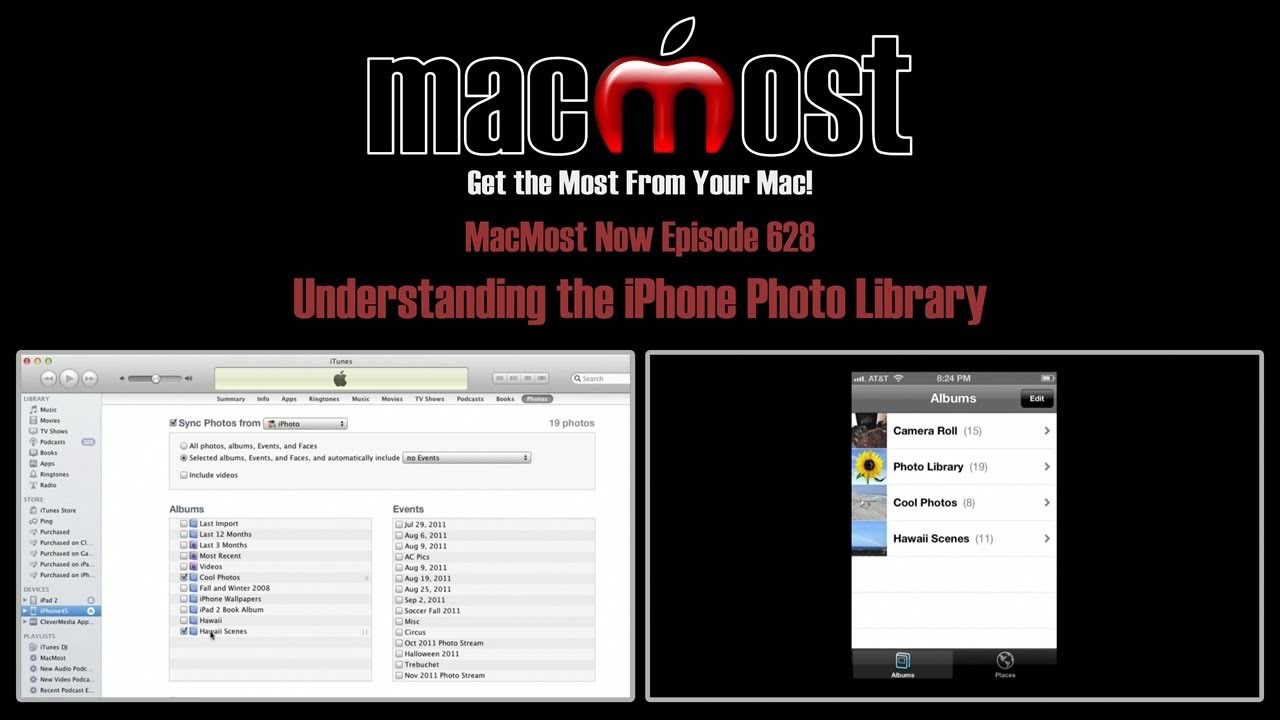
When you sync photos from your computer to your iPhone you will get an album named Photo Library in your Photos app. This isn't an album, but a complete list of all of the synced photos on your iPhone. It will include those in albums and events you have synced, but the photos are really only on your iPhone once. The Photo Library is just a way to view of list of all of these photos instead of viewing them by album or event.
▶ You can also watch this video at YouTube.
▶
▶ Watch more videos about related subjects: iPhone (355 videos).
▶
▶ Watch more videos about related subjects: iPhone (355 videos).


Hello Gary, Since the update to iOS 5 for the iPhone a few nutty things have been going on. I noticed that I can rearrange the photo albums now on the iPhone; nice, however when I sync with iTunes it rearranges back to it's previous state. I can find no way to arrange the albums in the order I wish to see them and keep it that way. Arranging folders within iPhoto doesn't help either. Am I missing something? Is the trick to create a smart folder? Thank you for your tutorials and news letter ... I often refer people to your tutorials ... Thanks Much! Lee
I guess that is just the way it works. Computer settings override iPhone settings during sync.
My MacBook hard drive crashed and I lost many of my photos. I had synced them with my iPhone and they are in the iPhone Photo Library. Any way to copy them from my iPhone onto my new hard drive in my MacBook?
The easiest way is to email them to yourself.
But keep in mind that the original photos are lost. What you have on your iPhone are smaller versions optimized for the iPhone screen.
If you had a Time Machine backup, this would not be a problem -- everyone backup!
Gary, it says I have 11.5 gbs of photos on my iphone4s but I only have 31 pictures.... Why????
Hard to say. You must have ore photos than that. Can't help without seeing it.
Ur right I prob synced photos by accident n had like 700 pics (11.5 gigs)lol... BUT I synced again so I would have 0 pics on iPhone n says I have 9 gigs of pics don't no why... I recovered 2.5 gigs but don't no where the other 9 gigs are...??? O_o thanks for da help
Hi Garry.
Thank you so much for this tutorial! Amazing! Now I understand!
I thought I had a problem with my software. Even the reseller could not explain it to me.
Keep up the good work! I have bookmarked this website and will be back!
Matthew.
how do I share my photo albums with other Iphone users without having to go to my PC?
There are many apps that do this: Flickr, Picasa, DropBox, etc. Probably dozens more.
What is drop box? Does apple support it and can I move all my mobile me docs movies etc to it. I don't want to move over to lion. Hearing from colleagues they found problems I Love snow leopard so the iCloud is not an option for me. Any ideas?
DropBox:
http://macmost.com/sharing-files-with-dropbox.html
http://macmost.com/sync-files-with-dropbox.html
I would move docs to it, yes (small files), but I wouldn't but a huge collection of large files there (movies) or with any cloud service (iDisk, etc) as that would mean a ton of file transfer going on.
What problems have you heard about Lion? I upgraded all my Mac day one and enjoy the new features. The last 100+ videos at MacMost are all Lion. Soon Mountain Lion will be out and you'll be 2 versions behind.
issue: I synced my grandmas iPhone to my computer, then synced mine, all her albums are now on my phone and I cannot figure out how to delete them. you cannot go to edit and delete, you can only delete your own albums. iTunes does not give me a list of any of the albums. I just want to get rid of the albums. do I need to restore my phone?
well can't i keep all the pics in the photo library and delete the other albums?
You can have whatever photos you want on there. They just have to all be in your iPhoto collection and then use albums or events to determine which ones sync.
I am wondering if there is a way to rearrange my pictures in the photo library. I have them the way I want them on my computer in the file it downloads to my phone from but once it gets to my phone the pictures are just all over the place. Also, on my computer in the picture file the pictures are all facing the correct way but once they transfer to my iphone in the photo library that are all upside down or sideways. Please help... I am ready to smash my phone >:(
Have you tried creating an Album in iPhoto and organizing them there? Then transferring the album to your iPhone -- that should keep the right order. Otherwise, I think they are in date order.
As for orientation, it may be that the iPhone is using the orientation data in the file, and ignoring the rotation. Haven't run into that problem myself.
Unfortunately, I had the same thing happen to me. My iMac was a little over a year old and I hadn't got around to setting up Time Machine. I had 3030 photos in my library, and had scanned in hundreds of old family pictures. I bought an application to transfer my photos back to my iMac called Photo Transfer. My question is this ... Are the photos on iPad any better quality than the ones on iPhone?
Probably, yes. When you transfer photos TO the iOS device, it does it at a quality that makes sense for the device. So an iPad with a big screen would be better than an iPhone. Not sure of the details, but you can test it yourself and see.
hi gary.
If i want to have photos in my photo library but dont want them in an album aswell how do i do this? I dont want two folders with the same photos in which is what i have at the moment!
Remember, the album is just a way of organizing the photos, like playlists in iTunes. The photo is only there once. So if creating an album is the easiest way to get the photos you want on you iPhone, then you should use it.
Otherwise, you can choose by Event, Place or Face in your iTunes sync settings for that iPhone.
i have been trying to transfer my movie files i uploaded from my movie library to my photo library with the videos i recorded using the phones camera. but have found great difficulty doing so. any suggestions?
Can you explain in more detail. Which app did you use to take the videos? Which app are they in now? Which app do you want to get them to?
hi i synced all my photos from my laptop to my iphone and it shows up in photo library and pictures which is the name of the folder the pics were in but it is 100% taken up twice the space cause whhen i highlight all the photos on laptop it says size 2.5gb but my iphone is saying 5.1gb of photos so therefor it is definitely saving them twice any way to stop this
many thanks
Hey Gary,
I need to transfer my photos from my photo library to my camera role. I then want to delete my photo library. Please help me out. I have a feeling it's not gonna be to simple.:/
Your Camera Roll contains photos you created on your iOS device. Your photo library contains photos you sycned from your computer. It doesn't make sense to transfer from the Library to the Camera Roll. Why do you want to do it?
I wanted to do it so I could delete my photo library from my iPhone. I can delete photos from camera role just not photo library. I downloaded an app tho, and copied all my pics from my library to the App. Than exported them to my camera role. Then deleted the app. Went on my iTunes and took the photo library off my phone. I wanted to do it because I had photos in my photo library that I wanted to delete ad couldn't.
To remove photos from your photo library, simply re-sync your iPhone and choose which photos you want to sync. For instance, if before you chose to sync "all photos" and you don't want that, then modify your settings so you only sync the photos you want.
Oh, ok. Simple enough! Thanks for the help!:)
Hi Gary,
1.) I have around 250 photos on my camera roll (no problem with this one)
2.) I also have 650 photos & 30 videos synced from my computer.
They are appearing twice in my iPhone.
Once under the name of "Photo Library" and the other one in the name of " iPhone Photos", even though contents of both these albums are same. Now, i am running out of space in my iPhone.
My query is: Are they consuming the memory space twice....?
If yes, how to delete one of them..??
Please help
-Raj
Watch the video. That is exactly the question the video answers.
Very clear, thanks a lot gary
When I look at the album list on my phone (iPh 4, ios 6), I see only the camera roll. What do I have to do to get the Photo Library to appear on that list? I know it's there but I don't know how to access it on my phone? Thanks.
If you are looking at the Camera Roll in the Photos app, then tap the Albums button at the top to go to your full list of albums. If you only see Camera Roll listed there, and no other albums, then you have added any albums (either by syncing with iTunes to add them, or creating them in some app).