
MacMost offers a variety of online courses. Some are at Patreon and others at courses.macmost.com.
Courses at Patreon:
Mac Numbers
Mac Pages
Mac Photos
Mac Shortcuts
All courses from MacMost at Patreon
Courses at courses.macmost.com:
The Guide To macOS Tahoe
Keynote: Building Presentations On Your Mac
iMovie: Creating Videos On Your Mac
All courses from MacMost at courses.macmost.com
Short Answer: Use this month's coupon code.
There are usually two coupon codes issued each month. One is posted at Patreon each month for those that support MacMost there, and another that comes with the first issue of the free MacMost newsletter each month. After you get the code from one of those two sources, here is how to apply it to get a discount.
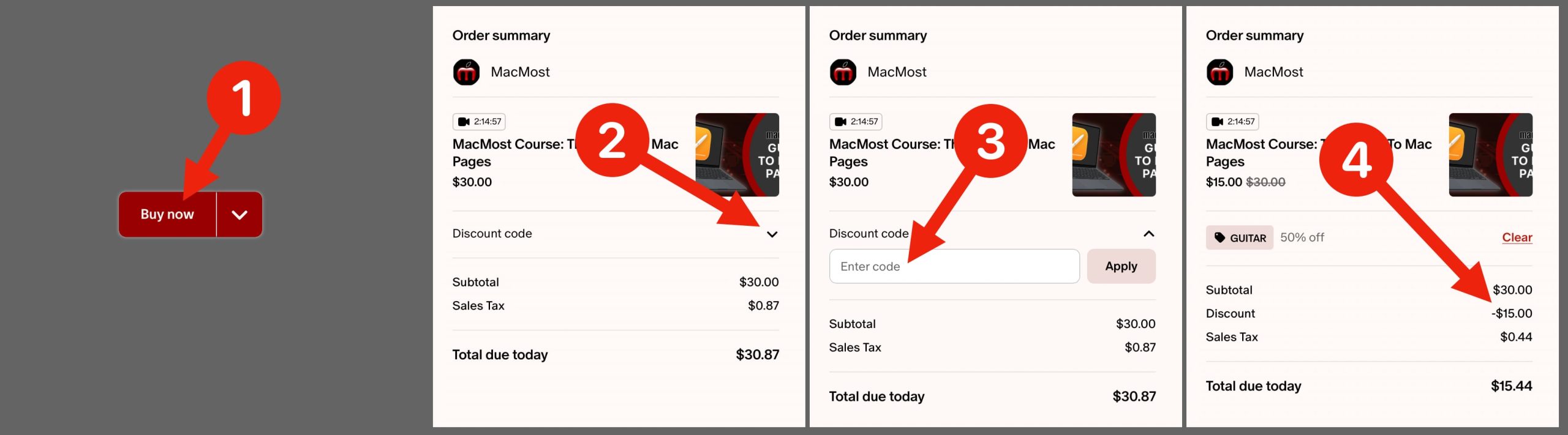
For courses for sale at Patreon.com, you can use the same coupon codes. After you click the Buy Now button, the next page shows your cart. Click the reveal button next to the Discount code label. Note: If there is a sale, you may have to click CLEAR first to dismiss the sale code, and then the Discount option will appear. Then enter the code into the field and click Apply. Then check carefully to make sure the code is applied and the new total reflects the change.
For the courses available at the site courses.macmost.com, when you get to the "Cart" page during the purchase process, you will see a red field with an "Apply Coupon" button next to it. Put the coupon code in there and click the button. Double-check that the discount has been applied on that page before proceeding.
Note that Club MacMost Plus members ($20 USD/month level or higher) get the courses for free. For Club MacMost Plus members wanting the courses at Patreon, it is automatic. To use that benefit at courses.macmost.com, you’ll need to message me (through Patreon is best) and let me know your courses site user ID (sign up for a free account) and the course you want to take. I then manually add that course to your account. If you are logged into your account the course will simply be there for you to watch, no purchase necessary.
Short Answer: Return to the page for that course to watch the video(s).
For courses.macmost.com, just go there and log in with your account. Then you'll arrive at the Dashboard and see the courses you have purchased. Click on the course to go to the list of videos. Click on the video you want to play. Then look for the play button on the video that appears.
For courses at Patreon, just go back to the exact same page at Patreon where you purchased the course. If it helps, bookmark the page to return to it easily. Here are direct links to the three courses at Patreon: The Guide To Mac Pages, The Guide To Mac Photos, Introduction To Mac Shortcuts, and Mac Numbers Fundamentals.
Short Answer: If you are logged out or logged into another account, the site doesn't know you purchased the course.
For a course at courses.macmost.com, you need to be logged into that site and logged in using the same account ID (email address) you used when you purchased that course.
For courses at Patreon.com, make sure you are logged into your Patreon account. If you are not logged in, then Patreon doesn’t know who you are and doesn’t know you bought the course. Also, if you are logged in, check to make sure you haven’t logged in with a different email address or using one of the “Continue With…” buttons. It is common for someone to accidentally create a second account and be logged into the wrong one.
Short Answer: MacMost switched to using Patreon.com to sell courses in late 2025.
MacMost created its own website, courses.macmost.com, to provide multi-video long courses. This worked well, but still takes a considerable amount of time to update and maintain.
Later, Patreon started offering digital product sales. This makes more sense as a way to distribute courses as Patreon can handle the e-commerce and servers while MacMost focuses on the actual course content.
In addition, Patreon "Club MacMost Plus" users get courses for free. This is easy and automatic when the courses are also at Patreon. Previously, manual account management was needed each time a Club MacMost Plus member wanted to view a course.
With new courses being published at Patreon, eventually all current courses will be there. But anyone who previously purchased a course at courses.macmost.com will always have access to those courses.
Short Answer: No.
The courses at Patreon are sold as digital products there. If you are not a MacMost supporter at Patreon, you can simply buy the course as a one-time purchase. For courses at courses.macmost.com, that is a completely separate site.
Short Answer: It is automatic at Patreon, but manual steps are involved at courses.macmost.com.
At Patreon you get them automatically. Just go to the course page where others go to buy the course. You will just be able to play the course right away, with no additional purchase needed.
If you want a course at courses.macmost.com, then the course needs to be added to your account manually. If you haven't created an account at courses.macmost.com yet, then create one there. Then use the contact form at the bottom of the page there to request a course. Be sure to include your account ID at courses.macmost.com and your account ID at Patreon.com as they can easily be different email addresses.
Short Answer: If you buy a course you can take as long as you like and rewatch as much as you want.
Whether at courses.macmost.com or Patreon, a purchased course can be watched over and over again. You can take as long as you like to view the content. You can go through the videos immediately, or wait until a convenient time. If you are viewing a course without purchasing it at Patreon because you are a Club MacMost Plus member, then you can view all the courses at Patreon as much as you want, whenever you want, as long as you are still a Club MacMost Plus member.
Short Answer: Patreon.com and courses.macmost.com are two completely different, unrelated sites.
If you are trying to log in to courses.macmost.com with your Patreon ID and password, or you are trying to log into Patreon with your courses.macmost.com ID and password, note that these are different sites. Creating an account at one, does not create an account at the other.

