
Use this month’s coupon code.
There are usually two coupon codes issued each month. One is posted at Patreon each month for those that support MacMost there, and another that comes with the first issue of the free MacMost newsletter each month. After you get the code from one of those two sources, here is how to apply it to get a discount.
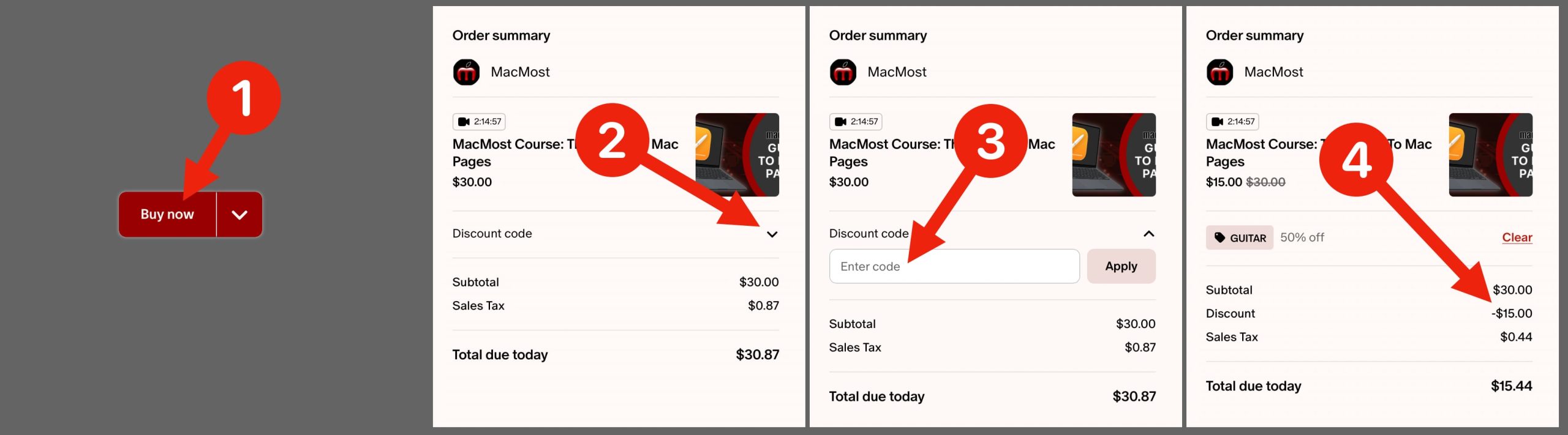
For courses for sale at Patreon.com, you can use the same coupon codes. After you click the Buy Now button, the next page shows your cart. Click the reveal button next to the Discount code label. Note: If there is a sale, you may have to click CLEAR first to dismiss the sale code, and then the Discount option will appear. Then enter the code into the field and click Apply. Then check carefully to make sure the code is applied and the new total reflects the change.
For the courses available at the site courses.macmost.com, when you get to the “Cart” page during the purchase process, you will see a red field with an “Apply Coupon” button next to it. Put the coupon code in there and click the button. Double-check that the discount has been applied on that page before proceeding.
Note that Club MacMost Plus members ($20 USD/month level or higher) get the courses for free. For Club MacMost Plus members wanting the courses at Patreon, it is automatic. To use that benefit at courses.macmost.com, you’ll need to message me (through Patreon is best) and let me know your courses site user ID (sign up for a free account) and the course you want to take. I then manually add that course to your account. If you are logged into your account the course will simply be there for you to watch, no purchase necessary.


Comments: No Comments Yet