

9/25/24
While a lot of attention goes to new iOS 18 features, here are 15 odd and interesting new features you may find useful. There are new Vocal Shortcuts, music haptics, Phone app searching, Calculator features and more.
9/24/24
Another minor change in macOS Sequoia is that the Chess app has a new look. Didn't know your Mac had a Chess app? Check it out...

9/23/24
In addition to the major new feature of macOS Sequoia, you can also now trigger the context menu with the keyboard, trigger Shortcuts with a voice command, hide what's behind you when recording video, and much more.
9/21/24
With macOS Sequoia and iOS 18 you can plan hikes using this new functionality. It works great as long as you start from a pre-existing trailhead point. But it does let you go off-trail and follow regular roads, even in the city.

9/20/24
With macOS Sequoia you can now tile windows to quickly snap them to halves or quarters of the screen. See all of the ways you can do this including the Menu Bar, the green button, keyboard shortcuts, and dragging. You can also combine previous window resizing options for more arrangements.
9/19/24
In addition to the major new feature of macOS Sequoia, you can also now trigger the context menu with the keyboard, trigger Shortcuts with a voice command, hide what's behind you when recording video, and much more.

9/18/24
iOS 18 for the iPhone has a lot of new features even before we get to Apple Intelligence. Try some new Home Screen looks, lock apps, schedule messages, do math in Notes and much more.
9/17/24
A new feature of Sequoia, and iOS 18, is automatic transcriptions of Voice Memos and audio in Notes. But you can also import audio into both of those apps and get just about anything transcribed locally and for free.

9/16/24
macOS Sequoia packs in a lot of new features even before Apple Intelligence is added. You have a ton of window tiling commands, a new Passwords app, Math Notes, audio transcriptions, iPhone Mirroring and more.
9/14/24
Here are new Home Screen and Lock Screen features you'll get when you update to iOS 18. You can now place icons anywhere, change the color appearance, switch to large icons with no labels, lock and hide apps, and even customize the buttons at the bottom of the lock screen.

9/13/24
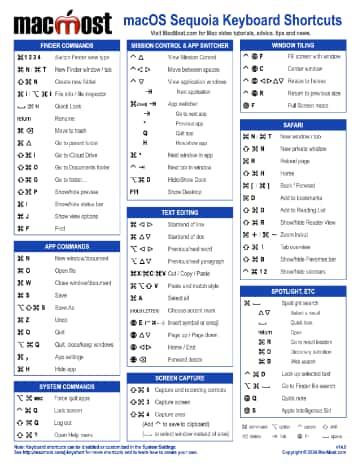
A quick way to get around in the Finder is to use the Go To Folder command, especially if you like using your keyboard more than a mouse or trackpad. Here are some advanced tips that you may not know about.
9/12/24
macOS Sequoia packs in a lot of new features even before Apple Intelligence is added. You have a ton of window tiling commands, a new Passwords app, Math Notes, audio transcriptions, iPhone Mirroring and more.

9/11/24
It may seem like you need to subscribe to Apple Music to use the Music app on your Mac. But you can simply ignore Apple Music in the sidebar and search results and use it with your own purchased or ripped songs. You can also disable it so it doesn't appear at all. And yes, you can still rip songs from a CD if you have an optical drive.
9/9/24
Apple announced its new iPhone lineup today, introducing a new physical Camera Control on all iPhone models, a new AirPods 4 with noise cancellation, and a redesigned Apple Watch 10.

9/9/24
After a macOS or app update it can be difficult to figure out what has changed. Here's how to see what's new in macOS update and also some techniques for finding out what's new in Apple and third-party apps.
9/7/24
The ability to create AI-generated characters that speak has come a long way in a short time. This could be a useful tool for those that want to make explainer videos but don't like being on camera.

9/6/24
You don't to print and scan a PDF document to sign it. You can use markup tools on your Mac to apply your own signature to a document. You can even do it quickly in Mail without needing to save the file. You can do it on the iPhone or iPad too.
9/5/24
Not every spreadsheet document has to be a big undertaking. You can use Numbers documents for simple calculations. Create and delete documents in the same way you may use Pages or TextEdit for quick notes or examples. Or keep a scratchpad spreadsheet around and reuse tables.

