

There are hundreds of keyboard shortcuts for Mac users. There are Spotlight shortcuts, window tiling shortcuts, Finder shortcuts, system shortcuts, application shortcuts and more. Many you can find by just looking through the menu bar for that application. You can find system ones by looking in the System Settings under Keyboard.
But some keyboard shortcuts are more useful than others. And some are harder to remember than others.
So MacMost has compiled a list of the top keyboard shortcuts for macOS 26 (Tahoe). Here they all are on a single PDF page, downloadable and printable: The MacMost macOS Tahoe Keyboard Shortcuts. Download it and pass it along!
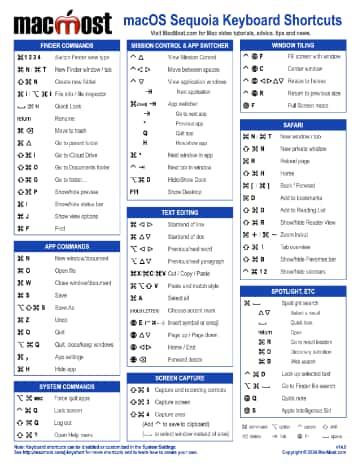
There are hundreds of keyboard shortcuts for Mac users. There are Mission Control shortcuts, Finder shortcuts, system shortcuts, application shortcuts and more. Many you can find by just looking through the menu bar for that application. You can find system ones by looking in the System Settings under Keyboard.
But some keyboard shortcuts are more useful than others. And some are harder to remember than others.
So MacMost has compiled a list of the top keyboard shortcuts for macOS 15 (Sequoia). Here they all are on a single PDF page, downloadable and printable: The MacMost macOS Sequoia Keyboard Shortcuts. Download it and pass it along!

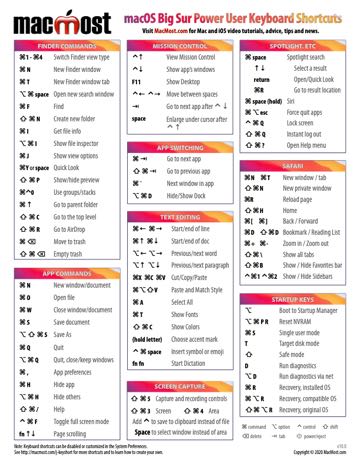
There are hundreds of keyboard shortcuts for Mac users. There are Mission Control shortcuts, Finder shortcuts, system shortcuts, application shortcuts and more. Many you can find by just looking through the menu bar for that application. You can find system ones by looking in the System Settings under Keyboard.
But some keyboard shortcuts are more useful than others. And some are harder to remember than others.
So MacMost has compiled a list of the top keyboard shortcuts for macOS 14.0 (Sonoma). Here they all are on a single PDF page, downloadable and printable: The MacMost macOS Sonoma Keyboard Shortcuts. Download it and pass it along!
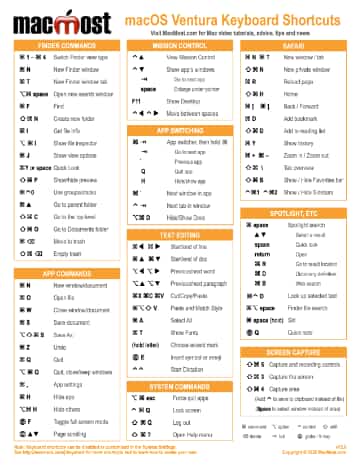
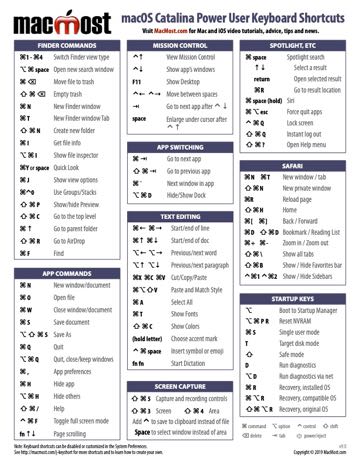
There are hundreds of keyboard shortcuts for Mac users. There are Mission Control shortcuts, Finder shortcuts, system shortcuts, application shortcuts and more. Many you can find by just looking through the menu bar for that application. You can find system ones by looking in the System Preferences under Keyboard.
But some keyboard shortcuts are more useful than others. And some are harder to remember than others.
So MacMost has compiled a list of our top “power user” keyboard shortcuts for macOS 13.0 (Ventura). Here they all are on a single PDF page, downloadable and printable: The MacMost macOS Ventura Keyboard Shortcuts. Download it and pass it along!
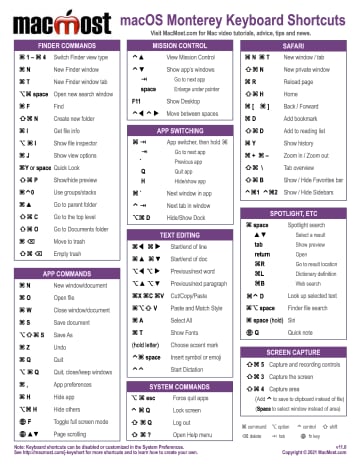
There are hundreds of keyboard shortcuts for Mac users. There are Mission Control shortcuts, Finder shortcuts, system shortcuts, application shortcuts and more. Many you can find by just looking through the menu bar for that application. You can find system ones by looking in the System Preferences under Keyboard.
But some keyboard shortcuts are more useful than others. And some are harder to remember than others.
So MacMost has compiled a list of our top “power user” keyboard shortcuts for macOS 12.0 (Monterey). Here they all are on a single PDF page, downloadable and printable: The MacMost macOS Monterey Keyboard Shortcuts. Download it and pass it along!
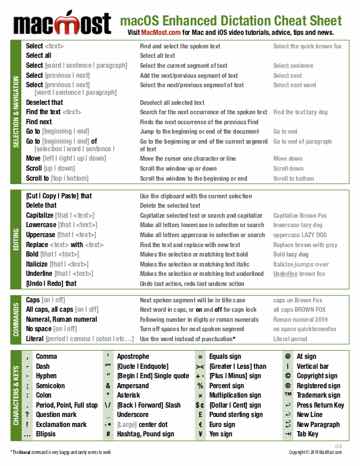
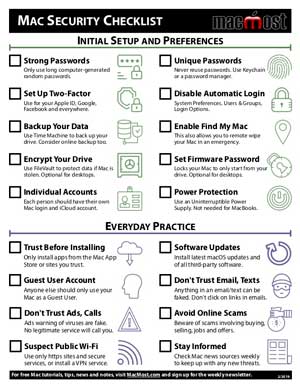
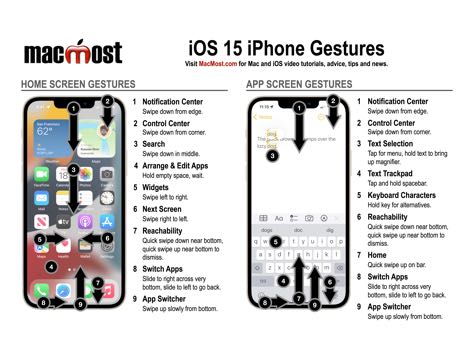
Keeping your Mac free of malware and using strong passwords for your online accounts are two important things you need to do to stay safe and secure. But even if you succeed at these, you can still be vulnerable to common scams that use social engineering to trick you out of your money, privacy and security. Even the most intelligent person can fall victim to a scam if they don’t recognize it when it happens to them. The key to keeping yourself safe is to know the common scams so you recognize them when someone tries to trick you.
For almost three decades Photoshop has been the king of image editing apps on the Mac. But it is clearly a professional tool, with a professional price and learning curve. The Photos app that comes with your Mac has a great set of image adjustment functions that meets the needs of most users. And Preview has some image editing tools too. But what if you need more? Here is a list of apps you can get directly from developers or the Mac App Store that won’t break the bank. These developers come out with new versions all the time, so be sure to check the sites for the latest prices, features and options.
A common question people have is “What does this icon mean in the iPhone Weather app?” The iPhone Weather app gets its information from Yahoo Weather. The forecast should be the same as if you want to Yahoo and looked up the weather for your area. But the iPhone Weather app doesn’t include descriptions of the graphic icons that appear next to each day.
Some are obvious. A bright yellow sun means “sunny.” But others are less obvious. So you would think that there would be a guide somewhere to these icons.
Not only is there not a guide, but it seems the icons used in the iPhone app are not used anywhere else. Yahoo has many different sets of weather icons for use on their sites and by third-party developers. But none exactly match the ones used on the iPhone.
However, the following set comes very close. Close enough that you should be able to find a match if you are unsure what an icon means. Note that some icons are used for multiple weather conditions. For instance, Tropical Storm and Hurricane use the same icon as Thunderstorms.
