

Monthly Archives: July 2018

7/14/18
While editing in Photos on a Macbook Air running Sierra, I find that I cannot figure out how to select a new key photo for a live photo. —– Justin Lodge ... (1 Comment)
7/14/18

When Apple surprised everyone with new MacBook Pros this week, the first question many asked was whether the keyboard was fixed. The previous generation of MacBook Pros were plagued by keyboards that broke easily. Often this was caused by dust that got under the keys. (more...)
7/13/18

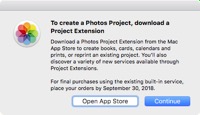
Apple quietly announced, through an alert in the latest update to High Sierra, that they will no longer be offering print products like books, posters, and calendars. They have been offering such services since 2002 in iPhoto. The service will end September 30, which probably corresponds to the release of macOS Mojave. (more...)


7/13/18
Macos 10.13.6 Only can print one at a time. Laborious! —– Art C ... (2 Comments)
Technical Terms: Augmented Reality
7/13/18
Apple is using the term Augmented Reality to describe the combination of camera, 3D graphics and motion detection to view the world through your iPhone and see additional added elements. This can be used for practical purposes or entertainment.
7/13/18
I have had an Apple ID for many years, with no problems. I use the two factor authorization as well. My Apple ID uses a hotmail account. Most of my mail uses gmail accounts. In general, I prefer gmail and had considered changing my Apple ID to use one of those gmail accounts. I ... (2 Comments)
7/13/18
I have made a document in pages and can’t remember where I have saved it. So I do a search in spotlight and find the document. I can even work on it and when I close the page document changes I made get saved, but I dont know where. In previous OS versions you could see the ... (1 Comment)
7/12/18
Apple mail occasionally marks ‘valid’ mail as spam. Mail used to have the means to stop that using a box to tic. I’m getting several ‘valid’ emails being dumped into the Spam (and all its asterisks) mailbox that don’t belong there. Not all of ... (4 Comments)
7/12/18

Apple surprised everyone today with the release of new MacBook Pro models, and the retirement of the oldest in the line. The new models look essentially the same, but there are a lot of changes under the hood. (more...)

How To Simulate Dark Mode In Pages
7/12/18
Dark Mode is coming in macOS Mojave, but it doesn't give you a way to write in that kind of environment. You can get that now in Pages if you simply set the background of your document to black and the text to white. Doing this requires the use of Section Masters, a shape, and changing the style for the text. You can then revert to regular colors, or copy and paste text from a dark mode document to a normal one.
7/12/18

When you open image files in Preview, they may open in the same window if you select a group of images and open them, but then if you open them one at a time they will be in separate windows. If you’d rather they always opened in the same window, or always in separate windows, you can set this in Preview, Preferences, Images.

7/11/18

Both MacRumors and AppleInsider are reporting on an analyst report that Apple may update almost every major piece of hardware in the next six months. In addition to MacBook speed updates, there may be a new MacBook Air or a new low-cost model to replace it. The iMac may get a significant update and even the Mac mini as well. A whole new line of iPhones, some with OLED displays and all with Face ID and A12 processors. Also perhaps a new iPad Pro with Face ID and no Home button. And last but not least, a new Apple Watch with a larger display and new health features. (more...)


What Does Apple Mean By Vintage and Obsolete?
7/11/18
If you hear that your Mac or other Apple product has become vintage or obsolete, then it doesn't necessarily mean that Apple has cut off all support for it. While hardware repairs will be more difficult in some cases because Apple won't stock those parts, macOs and other software will still be provided for those devices for some time. And the Genius Bar can still be helpful for many issues.
7/11/18
As Apple are no longer producing the Time Machine (ours is now playing up) what do you recommend as a replacement Gary? —– Kathy George ... (4 Comments)
7/10/18

There are conflicting reports today about Apple’s relationship with 1Password, the password manager by independent software developer AgileBits. A report states that Apple is now buying 1Password licenses for all employees. But others are saying that Apple was already doing this, and has for a few years. But what is also interesting is that the report states that Apple is looking to acquire 1Password/AgileBits. (more...)

How Mac Trash Handles External Drive Files
7/10/18
The way the Trash works is pretty straight-forward for your internal drive. But how about files on external or removable drives? Any file you put in the trash remains on that drive, but appears as a aggregated list when you view the Trash folder. You can only see files in the Trash on the same computer and user that threw them away.
7/10/18
I have a budget table and types of bills categorised e.g. insurance, utilities, etc. When I create my pie chart it does not consolidate the types of bills; so that instead of adding say two insurance totals under the insurance legend, it has two insurance legends with two ... (1 Comment)
7/9/18

Just a quick look at Dark Mode. Is this a feature you are looking forward to?

7/9/18

Apple changed everything a while back with iTunes, proving that people would pay for online music and that the future was all Napster-pirated stuff. But services like Spotify pioneered another way to distribute music online using subscription streaming instead of buy-and-download. (more...)


7/9/18
i wish to create a spreadsheet to show a bank balance of my daposits and withdralals over the last 12 months ie date – amount give me total over last 12 months only and update balance as the date changes but how do i create a sum = columns range based upon date = now thru ... (1 Comment)