Dominating Apple news this week was the release of version 2.2 of the iPhone OS. This included some pretty interesting new features, such as Google Maps street view and the ability to download podcasts directly on the iPhone instead of requiring them to be added to iTunes on your Mac or PC first. See episode 162 of MacMost Now for more details.
QuickTime update 7.5.7 seems to fix a problem where standard definition movie rentals cannot be watched on an HD screen connected to a Mac. This triggered an HD anti-piracy restriction called HDCP, which is meant only for HD content, not the SD content used for movie rentals in iTunes.
An update to iTunes itself, version 8.0.2, adds VoiceOver accessibility to control iTunes, plus a quality fix for making .mp3 files with iTunes. A bug was also fixed that may have prevented connecting to the iTunes Store through a proxy server.
In the United States, this is thanksgiving week, which is followed by “black friday” — a day of shopping and special sales to kick off the holiday shopping season. For the last few years Apple has participated both online and in stores with some special deals. Be sure to check the news at MacMost.com on Friday to see what’s on sale.

Chaperoning elementary school field trips is something every parent should try to do. You’re pretty lucky, though, when your first call to do one is a visit to the Apple Store.
Apparently some Apple Stores offer opportunities to allow schools to bring in classes. The employees then teach something age-appropriate using the Macs in the store.
In this case, we brought about 17 kids in and they divided them up, two per Mac. They actually used MacBooks, MacBook Pros and MacBook Airs. This was done with the sample machines scattered in the store for customers to play with.
For this first grade class, the tasks were simple. First, they had them open up Photo Booth. The kids had a blast taking pictures of themselves, especially when they were shown the special effects.
Then they opened up Pages. I thought it was weird to have them work with a program from iWork, but it was basically an introduction to publishing, and iWork is the publishing tool.
The kids were shown how to make shapes on the page, and then drag their photos from the PhotoBooth panel to the shapes. They then added a bit of text, usually talk bubbles.
While all the kids had experience with computers before, most seemed a little uncomfortable with the track pad as they are used to mice. But instructions like “drag the triangle along the slider to zoom out the picture” were understood easily.
It is obvious what the goal was here for Apple — get the kids to come home with their printouts and “certificate” and talk to their parents about how cool the Apple Store was. Maybe even force a detour into the Apple Store the next time the family goes to the mall.
From the school’s side of things, there was some benefit as well. I think it was a pretty comparable experience to an in-school computer class — at least at the first grade level. The kids gained a little more knowledge about what computers can do and how to use them.
So it was a win-win. A win-win-win if you count me in there. I mean, how often do you get to participate in a school field trip, do some research for work, and have a good time all at once?


Several small announcements and updates this week from Apple. The AppleTV OS version 2.3 was released, with AirTunes streaming and the support for third-party remote controls. That’s a good idea considering how small the Apple remote is and how easy it is to lose. And, of course, the fact that anyone with a home theater setup (AppleTV’s target market) is using a multi-device universal remote anyway.
But in other home theater news, Apple has given in to another draconian anti-piracy measure by building in HDCP (High Bandwidth Digital Content Protection) into the new line of MacBooks. That means that you can’t play protected movies you bought from iTunes on large TVs and projectors unless they are “HDCP authorized.” If you are wondering how this is supposed to prevent piracy, or do anything other than upset Apple’s paying customers, you are not alone.
But then on the other side of the DRM battle, Apple is supposedly in talks with Sony, Warner and Universal to join EMI in allowing Apple to distribute non-DRM versions of their music through iTunes.
This week we are also finally starting to hear Snow Leopard rumors. The Mac OS X 10.6 operating system is potentially ahead of schedule and may ship earlier in 2009 than expected — perhaps in the first quarter.

The free Google app now allows you to search the Web by speaking into your iPhone. It will attempt to translate what you say into text and search the Web or pinpoint a location on the map.
Back in January of 2007 when the iPhone was announced, many people cheered. People cheered the touch screen. People cheered the beautiful design. People cheered the fact that the rumors were right.
I cheered what Steve Jobs said about the built-in Safari Web browser: that it would allow you to surf the real Web. In other words, that it would be a real Web browser, capable of displaying Web pages just like a Mac or PC.


Data Detectors allow you to turn addresses, phone numbers and dates in mail messages into Address Book contacts and iCal events. You can also turn selected text into to-do items or stickies.
Despite the global economic crisis, 2008 seems to be a year of growth for Apple. A filing with the Securities and Exchange Commission shows that Apple added more than 13,000 full-time and contract workers. Most of these populate the 50 new Apple stores opened this year. Apple also showed a 40 percent increase in research and development spending. Hopefully that means more cool new products coming next year.
But one area of 2008 growth, the iPhone App Store, is showing some growing pains. Apple rejected yet another App for questionable reasons. CastCatcher, from developer return7, was simply submitted for an update from version 1.2 to 1.3 when it was rejected because “it is transferring excessive volumes of data over the cellular network.”
CastCatcher is a streaming radio App, similar to others in the App Store. The developer believes that version 1.3 uses the same amount of bandwidth as these other apps, as well as version 1.2 of CastCatcher, which is still available in the store.
This is just the latest in a series of puzzling decisions by Apple about which apps to accept and which to reject.
Significant updates this week include a major batch for the iPod Nano and a new version of Parallels. The iPod Nano update includes support for the new Apple in-ear headphones with remote and microphone, the ability to turn off cover flow, and some bug fixes. Parallels 4.0, software used to run Windows and other OSes in a virtual environment, includes a new look and some significant speed increases.

So the new MacBook Pros have lots of upgrades: faster processor, better video chips, more standard memory and hard drive space, a snazzy new aluminum shell. But they have one downgrade: the video port.
The new MacBook Pros, like all the MacBooks, now use a Mini DisplayPort for external video. While this is supposed to be a industry-standard can-do-anything port, it is a poor substitute for the DVI port on the older MacBook Pros.
For one, there are almost no monitors in existence that support Mini DisplayPort. The new 24 inch Apple monitor does, but the old ones do not. So you need an adapter. No problem, right? Just use the adapter that comes with the MacBook Pro. But wait, no adapters come with it at all.
So Apple decides to move forward to use a very new type of video port, and then doesn’t even give us the adapters that they used to include.
So you can get a VGA or a DVI adapter, purchased separately. But large monitors, such as the 30 inch Apple Cinema display, and any 30 inch monitor, require a Dual-Link DVI adapter. The plain DVI one won’t do.
So Apple has a third adapter: Mini DisplayPort to Dual-Link DVI Adapter. Check it out. It is $100! Worse, it isn’t even available yet. And it will use both the Mini DisplayPort and a whole USB port for power.
So there is currently no way to hook up a new MacBook Pro to a 30 inch monitor. This sort of configuration is common among media professionals like myself who like the portability of a MacBook Pro, but need to have a huge desktop when working in programs like Flash, PhotoShop or Final Cut.
It makes me appreciate the Dual-Link DVI built into the side of my current MacBook Pro. And it made me forget about ordering a new MacBook Pro, at least for the time being.
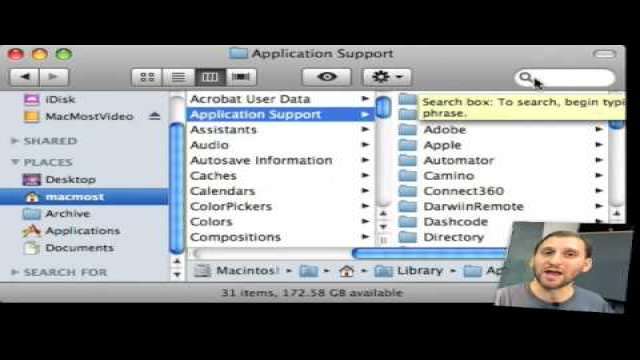
Sometimes removing an application isn't as easy as dragging the application to the trash. Learn how to find the files that are left behind and clean up after an uninstall.

Many people have been reading the signs lately and trying to predict the future of the Mac Mini. In fact, it’s death has been prematurely predicted several times before. But Apple responded directly an email from a Mac Mini fan with a phone call. An Apple representative told him that that Apple knows the value of the Mini and seemed to indicate a new version of the machine will be available soon.
But that probably won’t be until next year, as Apple has stated that no new machine updates will be coming out this year. This is probably to encourage people to go ahead and buy holiday presents and Mac as end-of-year expenses right now. It also makes sense that any major changes will wait until the MacWorld announcements in January.
The new MacBook Air is shipping, with its upgraded video chips. But the base level machine, with a 1.6GHz processor seems to have been delayed. People with orders have been told they won’t get theirs until after Thanksgiving.
In iPhone news, it is confirmed that AT&T’s free iPhone WiFi access at Starbucks and other AT&T hotspots is official. We received and email directly from AT&T with the procedure. iPhone users at an AT&T hotspot need to look for the “attwifi” network and then they will be asked for their 10-digit phone number. A free text message will then give them a link to follow to complete the connection.
Looks like we’ve been given an early holiday present by Apple: a break from the Apple rumor mill. Apple made an official statement this week that there will be no updates to product lines before the end of the year. No new iMacs or Mac Minis, which is the opposite of what we’ve heard on Apple rumor sites.
Now the reason for such an unusual announcement is obvious: Apple wants to sell some product for the holidays and they want the selling to start now. Rumors of new product updates always get people waiting instead of buying, hoping to avoid buying a computer just before a new version comes out.
So this may be the perfect time to buy, knowing you’ve got at least two months ahead where your purchase will remain the latest and greatest.
Of course early January brings MacWorld, where Apple traditionally announces something new. New iMacs and a Mac Mini update or replacement are likely there. But that’s a long time to wait if you need a new machine.